

Written by Bruce Zhou
Founder & Managing Director | JOTA Machinery
Paper converting machinery specialist since 2002.
Connect with me on LinkedIn
Published: 28,October, 2026
Last Updated: 28,October, 2026 17:52:59 PM GMT+8
A thermal paper manufacturer has completed a production order for POS receipt rolls.
The jumbo thermal paper has been slit into narrow strips, rewound into finished rolls, and transferred toward the packaging section.
Thousands of rolls may look almost identical.
They may have the same paper width, outside diameter, core specification, and packaging arrangement.
But what happens if a customer reports a problem with one particular shipment?
How can the manufacturer identify when those rolls were produced, which jumbo paper batch was used, or which production order they belong to?
One practical solution is to introduce a batch numbering system for thermal paper rolls.

At JOTA Machinery, one available production-line arrangement is to install an industrial inkjet printer along the finished-roll conveyor.
As the thermal paper rolls pass the printing position, the inkjet system can mark them with production information such as a batch number, sequential identification number, or internal scannable barcode.
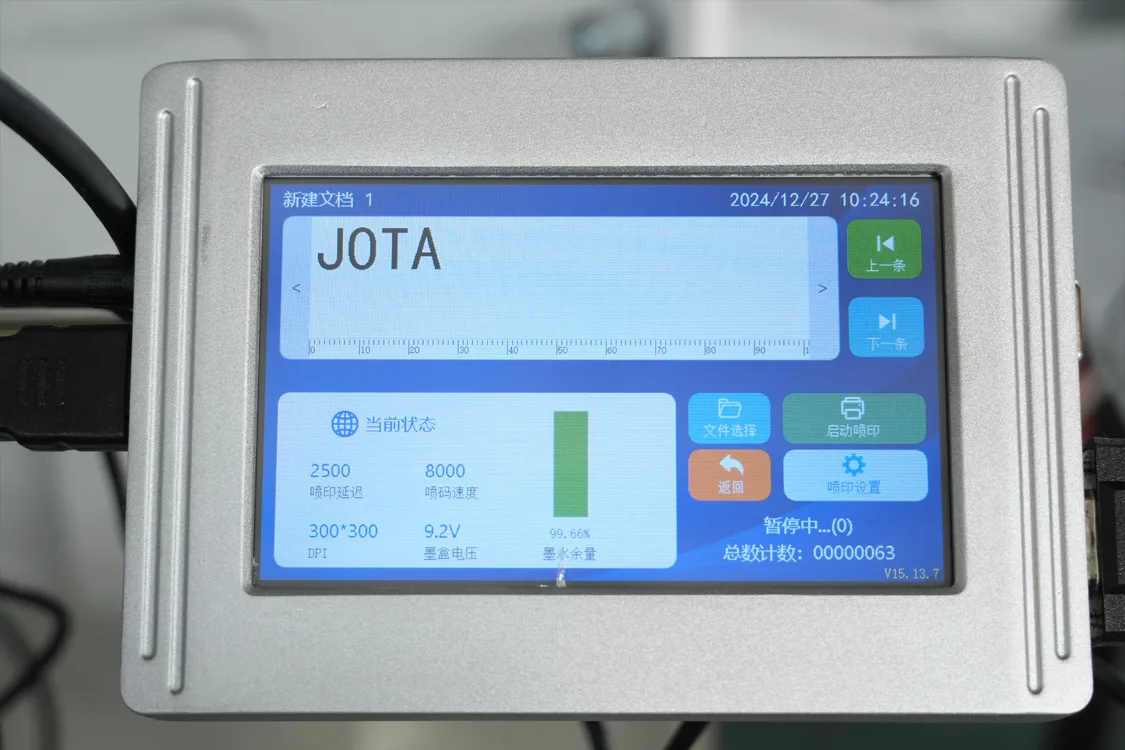
This provides a way to identify finished products without manually writing codes onto individual rolls.
However, an effective batch numbering system requires more than installing a printer.
The manufacturer must decide what information to print, where to apply the code, how to coordinate marking with conveyor movement, and how to connect the printed identification with actual production records.
This guide explains how to plan a thermal paper roll batch numbering system, how conveyor-mounted inkjet printing works, and what manufacturers should consider before integrating the equipment into an existing production line.
1. Why Do Thermal Paper Manufacturers Need Batch Numbers?
Thermal receipt rolls are consumable products manufactured in large quantities.
A single jumbo paper roll can be converted into many finished POS receipt rolls.
During normal operation, the factory may process different jumbo paper batches, finished roll specifications, or customer orders.
Without a reliable identification system, it can become difficult to distinguish one production batch from another after the rolls have been packaged.
Tracking Production History
A batch number can connect finished thermal paper rolls with a particular production record.
That record may contain the production date, jumbo paper supplier, raw material batch, machine identifier, finished roll specifications, and inspection results.
If a problem occurs, the manufacturer can retrieve the relevant information.
Investigating Customer Complaints
Suppose a distributor reports that some thermal receipt rolls have inconsistent printing performance.
The manufacturer needs to determine whether the affected products came from a particular jumbo paper batch or converting run.
A batch code can help narrow the investigation.
However, the code only supports traceability if the corresponding production data has been recorded accurately.
Warehouse and Inventory Management
Batch numbers can help warehouse staff distinguish different production lots.
This can be useful when several batches of the same finished roll specification are stored together.
Supporting Quality Control
If the factory finds a recurring quality defect, batch records can help identify which products may require additional inspection.
Instead of assuming every roll in the warehouse has the same problem, the manufacturer can investigate the affected production records.
A batch number gives finished rolls an identification reference. The traceability system behind that number makes the reference useful.
2. How Does Conveyor Inkjet Batch Printing Work?
One practical way to mark finished thermal paper rolls is to install an industrial inkjet printing unit along the conveyor.
The conveyor transports the completed rolls through the selected marking position.
When a roll reaches the printing area, a suitable sensor can provide a detection signal to the coding system.
The printer then applies the configured information onto the designated printable surface.
Depending on the equipment and production requirements, that information may include a batch number, production date, serial number, or barcode.
Basic Production Sequence
<escape>Slitting & Rewinding → Finished Roll Conveyor → Product Detection → Inkjet Printing → Optional Code Verification → Packaging</escape>
This sequence illustrates the intended workflow.
The exact location of the inkjet coding system depends on the roll-handling and packaging arrangement.
Step 1: Finished Rolls Enter the Conveyor
After slitting and rewinding, the finished thermal paper rolls are transferred to the conveying system.
They must travel through the coding area in a suitable position and orientation.
Step 2: The Detection Sensor Identifies a Roll
A photoelectric sensor or another appropriate product-detection device identifies when a roll reaches the selected point.
The signal is used to initiate the printing sequence.
Step 3: The Printer Receives the Required Code
The inkjet controller uses the configured batch information or sequential identification data.
For a common batch code, multiple rolls may receive the same identification.
For individual serialisation, the controller needs to generate or retrieve a distinct identifier for each roll.
Step 4: The Inkjet Printer Applies the Mark
The printhead deposits ink onto the designated surface as the roll passes.
The printed code may contain text, numbers, or a suitable machine-readable symbol.
Step 5: The Roll Continues Toward Packaging
After coding, the roll proceeds to the next stage.
If the process requires verification, a compatible scanner or vision system can inspect the applied code before the roll is accepted.
Printing and automatic barcode verification are separate functions. Both must be included in the equipment configuration if automatic verification is required.
3. Batch Number vs Serial Number: What Is the Difference?
Although batch numbers and serial numbers are often mentioned together, they serve different purposes.
A factory should decide which type of identification it needs before purchasing coding equipment.
Batch Number
A batch number identifies a defined group of products manufactured under specified conditions.
For example, a factory may assign the same batch number to all accepted thermal paper rolls produced under one designated production order.
An illustrative internal code could be:
TP-261028-A01
The factory might define this as a thermal paper production batch created on October 28, 2026, using an internal batch sequence.
The interpretation depends entirely on the manufacturer’s naming convention.
Serial Number
A serial number identifies a specific individual product or unit.
For example:
TP-261028-A01-0001
TP-261028-A01-0002
TP-261028-A01-0003
Here, the same batch identifier is followed by a changing sequence.
This allows the records to distinguish individual marked rolls, provided the system prevents duplicate numbers and maintains the necessary data.
Batch Numbering vs Individual Serialisation
| Feature | Batch Number | Serial Number |
|---|---|---|
| Identifies | A defined production lot | An individual item |
| Same code on multiple rolls | Yes | Normally no |
| Code changes | When the batch changes | For each new item |
| Typical purpose | Batch-level traceability | Unit-level identification |
| Record requirements | Production batch records | Individual-unit records where needed |
For some thermal paper factories, batch-level identification may be sufficient.
Others may want individual serial numbers, particularly when detailed internal tracking is required.
The right approach depends on the business’s traceability objectives.
4. What Information Should Be Included in a Thermal Paper Batch Code?
A batch numbering format should be understandable, consistent, and practical.
It does not need to contain every production detail.
In many cases, a compact reference linked to a production database or batch record is more useful than a long code printed directly on the product.
Production Date
The date can help distinguish production periods.
However, a date alone may not uniquely identify a batch if several jobs are produced on the same day.
Production Line Identifier
Factories operating more than one converting line may include a machine or line identifier.
This helps distinguish products manufactured on different equipment.
Batch Sequence
A sequence distinguishes separate batches produced during the same period.
Optional Individual Roll Sequence
Where individual serialisation is required, an additional sequence can distinguish rolls within the same batch.
Example Internal Numbering Format
| Code Element | Example | Meaning |
|---|---|---|
| Product prefix | TP | Thermal paper |
| Production date | 261028 | October 28, 2026 |
| Line identifier | L1 | Internal production line |
| Batch sequence | B03 | Third defined batch |
| Individual sequence | 00452 | Individual identification |
A possible code is:
TP-261028-L1-B03-00452
This is only an example of a private factory numbering system.
It is not a GS1 identification code and should not be presented as one.
The manufacturer must define how identifiers are created, when a new batch begins, and how numbering remains unique.
5. Where Should Batch Numbers Be Printed on Thermal Paper Rolls?
The printing position is important because thermal receipt rolls have limited available surfaces.
Not every part of a roll is suitable for direct inkjet marking.
The correct location depends on the roll geometry, substrate characteristics, packaging method, and customer requirements.
Printing on a Suitable Paper Surface
If the code is to be printed directly on the paper, its location must not interfere with the thermal-sensitive coating or the customer’s intended receipt-printing function.
The selected ink must be compatible with the surface being marked.
An unsuitable ink or chemical interaction can damage thermal paper or cause unwanted discoloration.
Printing on the Paper Core
Some product configurations may provide an accessible core surface suitable for marking.
However, the available space and orientation depend on the core design.
A coding system cannot assume every finished roll exposes a printable core surface to the printhead.
Printing on Packaging
Another option is to mark the wrapper, label, or carton after the rolls have been packaged.
This may be suitable when direct marking of the thermal paper is undesirable.
However, package-level identification is not equivalent to individually marking every roll.
If the package is opened and the rolls are separated, individual traceability may be lost unless another identification method is used.
How Should You Select the Marking Position?
Begin by defining the identification requirement.
If the code only needs to support carton-level warehouse traceability, marking the carton may be sufficient.
If individual rolls must remain identifiable after unpacking, the marking strategy must preserve that information.
The printer position and ink should be selected only after the intended marking surface has been confirmed.
6. What Type of Inkjet Printer Is Suitable?
Several industrial inkjet technologies can print variable information on moving production lines.
However, their suitability depends on the code, printing surface, conveyor speed, and required resolution.
Continuous Inkjet Printing
Continuous Inkjet, commonly called CIJ, is used for variable-data coding in industrial environments.
Depending on the system, it can print dates, lot codes, and other information on moving products.
The available print quality, code size, and ink compatibility depend on the specific equipment.
Thermal Inkjet Printing
Thermal Inkjet, or TIJ, uses replaceable ink cartridges and can provide high-resolution coding in suitable applications.
Certain systems support text, graphics, and machine-readable codes.
The correct ink and printhead configuration must be selected for the marking substrate.
Which One Should a Thermal Paper Manufacturer Choose?
The decision should consider the following requirements:
- Marking surface and ink compatibility
- Text or barcode format
- Required print height and resolution
- Conveyor speed
- Product orientation
- Printhead working distance
- Available installation space
- Ink drying and handling conditions
- Cleaning and maintenance requirements
For printing directly onto heat-sensitive paper, the ink and process must be specifically qualified for the selected thermal paper grade.
No inkjet technology should be assumed universally compatible with all thermal receipt paper.
7. How Does the Inkjet Printer Detect Each Thermal Paper Roll?
Accurate triggering is necessary when products move continuously along a conveyor.
The printer must apply the code at the correct time.
If the print signal occurs too early or too late, the code may be misplaced or incomplete.
Product Detection
A photoelectric sensor can detect a roll entering the coding area, provided the sensor arrangement is suitable for the product’s geometry and movement.
The detection signal can be used to initiate the print sequence.
Printing Delay
The physical distance between the sensor and printhead affects when printing should begin.
The controller may need an appropriate delay so that the printed information lands in the intended position.
Conveyor Speed
If conveyor speed changes, a purely time-based delay may no longer place the code consistently.
Some coding systems use encoder feedback to track conveyor movement.
This helps coordinate printing with actual travel distance rather than relying exclusively on elapsed time.
Product Spacing
If rolls pass too closely together, the system may have difficulty identifying individual products.
Suitable spacing, positioning, and product-handling conditions should be established.
Why Orientation Matters
Thermal receipt rolls are cylindrical.
If they rotate or shift unpredictably while passing the printhead, the printing surface may not remain in the expected position.
Depending on where the code must be applied, guides or other handling components may be necessary to stabilise the product.
A sensor and printer alone do not guarantee consistent code placement without suitable product presentation.
8. How to Print Sequential Numbers Automatically
Some thermal paper factories want more than a shared batch number.
They may want the inkjet printer to increase a serial number automatically as each roll passes.
For example:
000001 → 000002 → 000003 → 000004
An industrial coding controller with a suitable counter function can support this type of sequential numbering.
However, the system must define exactly when the counter advances.
Should the Counter Increase When the Sensor Detects a Roll?
That depends on the control design.
If the counter advances every time a sensor is triggered, false detections or repeated triggers could create gaps or unexpected number changes.
What Happens After a Printing Failure?
A counter may advance even when a mark is not successfully applied, depending on the equipment configuration.
If strict serial-number accountability is required, the factory must define how failed prints, rejected rolls, and skipped numbers are recorded.
What Happens After a Power Failure?
The numbering system should have an appropriate restart procedure.
Depending on the required traceability level, the controller may need to retain the last assigned number or retrieve the next authorised number from a connected system.
Preventing Duplicate Numbers
A serialisation system should not restart from the same initial value without an appropriate rule.
For example, if several production lines print the same format, the identification scheme must distinguish their assigned number ranges or use another method to preserve uniqueness.
Automatic numbering should be designed around the traceability requirement, not merely around the ability of a printer to count upward.
9. How to Print Scannable Internal Barcodes
A batch number can be printed as ordinary text.
However, some factories prefer a machine-readable barcode because it allows warehouse or production staff to retrieve information by scanning.
The barcode can carry a batch identifier, serial number, or another internal reference.
One-Dimensional Barcodes
Linear barcodes such as Code 128 can encode suitable alphanumeric identification data.
They may be practical when the factory uses an established internal scanning system.
The required printing space, resolution, and scanner compatibility should be verified.
Two-Dimensional Codes
Data Matrix and QR Code symbols can encode information in a compact two-dimensional format.
They may be useful when the available marking area is limited, provided the printer and scanner can reproduce and read the symbols reliably.
Internal Barcode vs GS1 Barcode
A manufacturer may use a private internal code format for its own warehouse and production management.
That is different from a standardised GS1 barcode used for trading-partner identification.
If GS1 compatibility is required, the data structure and barcode carrier must follow the applicable GS1 specifications.
For example, GS1 Application Identifier (10) represents a batch or lot number, and AI (21) represents a serial number.
The correct trade-item identification information must also be included where required by the selected GS1 application.
A private batch string should not be described as GS1-compliant simply because it is printed as a barcode.
10. Why Barcode Readability Matters
Printing a barcode does not automatically make it scannable.
The printed symbol must have sufficient quality for the intended scanner and operating environment.
Print Resolution
If the printer cannot reproduce the required line widths or two-dimensional code elements, the barcode may become unreadable.
Ink Contrast
The printed code must provide adequate contrast against its background.
A dark code on a suitable light surface may be easier to read than a low-contrast mark.
Actual performance must be tested.
Curved Surfaces
Printing onto a cylindrical thermal receipt roll can introduce geometric challenges.
Depending on the code dimensions and location, curvature may affect print placement and scanning.
Surface Condition
Paper dust, contamination, or unsuitable ink adhesion may reduce code quality.
Packaging and Handling
If the code is covered, distorted, or damaged during packaging, the scanner may not read it reliably.
Why Verification Is Useful
A handheld scanner can be used for routine checks.
For applications requiring stronger process control, a compatible fixed scanner or vision system can be integrated after the printer.
The inspection system can confirm whether the code is present and readable.
However, successful scanning is not necessarily equivalent to full barcode quality grading.
Where a formal barcode grade is required, an appropriate verifier and assessment method should be used.
11. How to Connect Batch Numbers With Production Records
An inkjet printer can print an identification code, but the printer alone does not create a complete traceability system.
The manufacturer needs a reliable connection between the printed code and the information recorded during production.
For example, each production batch may have an internal record containing the following information.
| Production Record | Example Information |
|---|---|
| Batch identifier | TP-261028-L1-B03 |
| Production date | October 28, 2026 |
| Machine | Internal slitter rewinder line reference |
| Jumbo paper grade | Approved material identification |
| Jumbo paper lot | Supplier’s lot reference |
| Finished width | 79 mm |
| Finished roll length | Agreed production specification |
| Core specification | Approved core details |
| Inspection result | Accepted or rejected |
| Packaging reference | Carton or pallet identification |
| Customer order | Relevant order number |
These are examples of information a manufacturer may choose to record.
They are not claims about a particular JOTA machine’s built-in database functions.
What Happens When a Barcode Is Scanned?
In a simple internal system, scanning the code may return a batch identifier.
The operator can then use that identifier to locate the corresponding production record.
In a more integrated system, scanning may retrieve the record directly from warehouse or manufacturing software.
This requires compatible software and data connections.
The coding system must be designed to match the factory’s actual traceability workflow.
Why Raw Material Records Matter
Suppose a customer reports a problem with printed receipts.
If the batch record identifies the corresponding jumbo thermal paper lot, the factory can investigate whether other finished products used the same material.
Without that recorded link, a printed batch number may provide very limited information.
12. Should Batch Coding Take Place Before or After Packaging?
There is no single correct location for every thermal paper converting factory.
The decision depends on what must remain identifiable after the finished products are packed.
Before Packaging
Marking individual rolls before packaging can help preserve identification at roll level, provided the code remains accessible and legible.
This may be useful when individual products need to be tracked.
After Packaging
Marking wrappers or cartons can be suitable for warehouse and shipping management.
It may also avoid direct ink contact with the thermal paper.
Combining Both Methods
Some manufacturers may want internal roll codes and separate carton-level identification.
If so, the systems should maintain the correct relationship between the rolls and their packaging.
For example, the carton record should identify the production batch or batches contained.
If individual roll serial numbers are used, the factory may need additional logic to associate them with the correct carton.
This relationship should not be assumed to exist automatically.
13. How to Build a Reliable Batch Coding System Step by Step
A manufacturer considering conveyor-mounted inkjet coding should begin with the traceability requirements.
Step 1: Define the Identification Level
Decide whether the factory needs batch-level identification, individual serialisation, or carton-level tracking.
This choice affects code generation, records, and scanning requirements.
Step 2: Decide What Information to Print
Keep the code concise.
Select the fields required by the intended workflow.
Avoid adding unnecessary information simply because the printer can support it.
Step 3: Choose the Marking Surface
Decide whether the code will be applied to the thermal paper, an exposed core, packaging material, or a label.
Confirm ink and substrate compatibility.
Step 4: Select the Inkjet Coding Equipment
Match the printer to the intended code format, substrate, conveyor speed, resolution, and operating environment.
Step 5: Design the Conveyor Marking Position
Ensure finished rolls pass through the marking area with suitable spacing and orientation.
Mount the printhead and detector according to the approved equipment arrangement.
Step 6: Configure the Printing Logic
Establish how batch numbers are loaded, when serial numbers advance, and how the system handles stopping and restarting.
Step 7: Connect Production Records
Create a method for associating printed codes with manufacturing data.
This may be a controlled manual record or a more integrated software system, depending on the factory’s requirements.
Step 8: Test Barcode Readability
If barcodes are used, print representative codes and scan them using the intended devices.
Check readability after normal packaging and handling.
Step 9: Validate the Complete Production Sequence
Run representative finished thermal paper rolls through the conveyor.
Verify code placement, print clarity, correct numbering, and handling of rejected or missed products.
Step 10: Train Operators
Operators should understand how to load the correct batch, verify the first printed code, identify printing faults, and perform the approved restart procedure.
The factory should also document what happens when a roll passes through without receiving a valid code.
14. Common Problems With Conveyor Inkjet Batch Coding
Even a properly selected inkjet printer can experience problems if product movement and printing logic are not coordinated.
| Observed Problem | Possible Cause | Recommended Check |
|---|---|---|
| Code is printed in the wrong position | Trigger timing or product movement | Sensor, delay and conveyor speed |
| Some rolls have no code | Missed detection or printer fault | Detection reliability and fault handling |
| Duplicate serial numbers | Incorrect counter or restart logic | Number generation rules |
| Barcode cannot be scanned | Poor contrast, resolution or code geometry | Print quality and scanner compatibility |
| Ink smears | Unsuitable ink or inadequate drying | Ink/substrate compatibility |
| Code varies between rolls | Unstable positioning or conveyor movement | Roll guides and product orientation |
| Incorrect batch appears | Wrong job data loaded | Batch changeover and operator approval |
| Code is hidden after packaging | Unsuitable marking position | Packaging and identification layout |
A factory should investigate repeated defects before increasing conveyor speed.
Higher throughput is useful only when the marking process remains reliable.
15. Why Batch Coding Should Be Considered During Production Line Planning
When manufacturers plan a thermal receipt roll factory, much of the initial attention goes toward the slitting and rewinding machine.
The main questions often concern jumbo paper width, finished roll size, production capacity, and packaging.
However, batch identification may become important as the business grows.
If the production line is designed without considering coding requirements, installing the system later may require changes to the conveyor or product-handling layout.
Reserve a Suitable Marking Position
The line should provide sufficient space for product detection, printhead mounting, and maintenance access.
If code verification is needed, the inspection equipment also requires an appropriate location.
Coordinate With the Packaging Layout
The code should remain meaningful after the finished rolls enter their packaging.
If the print is placed where the wrapper or carton will obscure it, the factory may need a different marking arrangement.
Consider Future Expansion
A factory may initially print only a shared batch number.
Later, it may want individual serial numbers or internal barcodes.
It is useful to consider these possibilities when selecting the coding controller and production-line interface.
However, extra functions should be added only when they serve an actual operational requirement.
16. JOTA Machinery’s Conveyor Inkjet Coding Solution
At JOTA Machinery, we manufacture thermal paper slitting and rewinding equipment for POS receipt rolls and other converting applications.
For customers who need batch identification, we can discuss integrating an industrial inkjet printer with the finished-roll conveyor.
The intended arrangement is straightforward.
After slitting and rewinding, the finished thermal paper rolls move along the conveyor.
As each roll passes the designated printing position, the inkjet coder applies the configured identification information to the suitable surface.
Depending on the selected coding equipment and project requirements, the printed information may include a batch number, sequential code, or internal machine-readable barcode.
Why Use Conveyor-Mounted Printing?
The coding operation can be positioned within the finished-roll handling process.
This may reduce the need for a separate manual marking step.
It also provides a convenient point for applying production identification before downstream packaging, where appropriate.
What Is Included in the System?
The exact configuration depends on the project.
A basic coding arrangement may include the inkjet printer, mounting arrangement, and suitable triggering interface.
More advanced requirements—such as automatic barcode inspection, serial-number database integration, or linking individual rolls to cartons—require additional hardware, software, and validation.
These functions should be confirmed in the technical proposal rather than assumed to be standard.
What Information Should Customers Provide?
If you are planning batch coding for your thermal receipt roll production line, share your finished roll sizes, conveyor arrangement, required coding surface, printing content, barcode format, and expected production rate.
It is also useful to explain whether you need one batch number for an entire production lot or a unique number for every roll.
Our engineering team can review the coding arrangement and its relationship with the conveyor and packaging process.
Explore JOTA Thermal Paper Roll Production Solutions
Conclusion: A Batch Number Is Only Useful When It Can Be Traced
A batch numbering system gives thermal paper manufacturers a practical way to connect finished receipt rolls with their production history.
One implementation is to install an industrial inkjet printer along the finished-roll conveyor.
As the rolls pass the marking position, the printer can apply batch numbers, sequential identifiers, or internal barcodes according to the selected equipment and configuration.
However, reliable coding requires more than printing a number.
The factory must define its numbering rules, choose an appropriate marking surface, coordinate printing with conveyor movement, and verify that codes remain readable.
It must also preserve the relationship between the printed identification and the corresponding production records.
For manufacturers that need more detailed traceability, scanning and software integration may provide additional capabilities.
The goal is not simply to put a code on a thermal paper roll. It is to make that code useful when the manufacturer needs to identify, inspect, or trace the product.
Planning to Add Batch Numbering to Your Thermal Paper Roll Production Line?
JOTA Machinery can discuss conveyor-mounted inkjet coding as part of a suitable thermal paper converting and handling solution.
Whether you need simple batch identification, sequential numbering, or a scannable internal barcode, the printing arrangement should be matched to your finished rolls and production workflow.
Send us your thermal paper roll dimensions, conveyor requirements, preferred code format, and production capacity.
Our engineering team can review an appropriate equipment configuration for your project.
Contact JOTA Machinery About Thermal Paper Roll Batch Coding
Last Updated on 28/10/2026 by Jota Machinery