

Written by Bruce Zhou
Founder & Managing Director | JOTA Machinery
Paper converting machinery specialist since 2002.
Connect with me on LinkedIn
Published: 28,October, 2026
Last Updated: 28,October, 2026 16:26:39 PM GMT+8
A customer wants to manufacture thermal receipt rolls with a company logo printed on the back.
The artwork is ready. The flexographic printing plate has been prepared, and the jumbo thermal paper is loaded onto the printing line.

But before production begins, the operator needs to answer an important question:
What type of ink should be used for flexographic printing on thermal paper?
Choosing the wrong ink can create serious problems.
The printed logo may look unclear, the ink may rub off after drying, or the printed surface may transfer colour onto adjacent paper layers during rewinding.
In some cases, an incompatible ink formulation or unsuitable drying process can affect the thermal-sensitive coating, reducing the quality of subsequent receipt printing.
At JOTA Machinery, we recommend using water-based flexographic ink formulated and approved for the specific thermal paper grade.
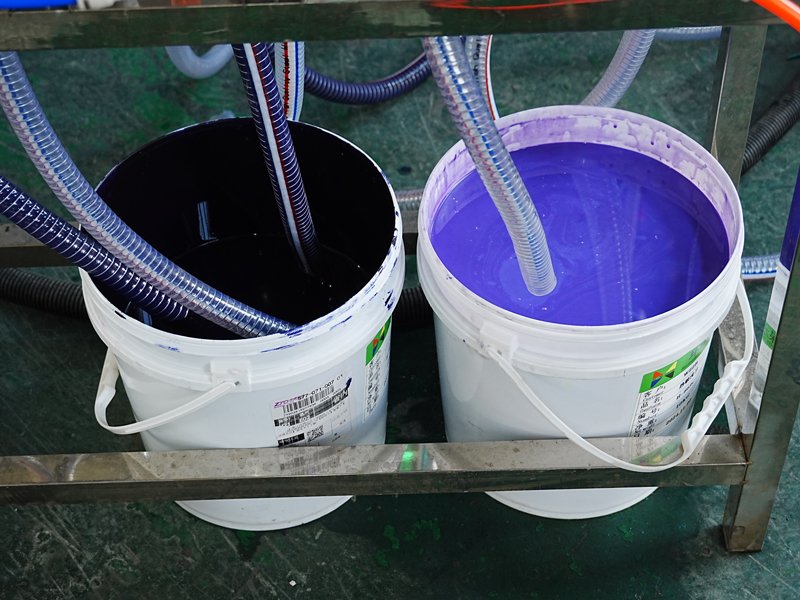
Water-based inks are commonly used for printing logos, text, and promotional messages on thermal receipt paper. They can provide suitable print quality and drying performance when correctly matched with the substrate and printing equipment.
However, the term water-based does not automatically mean an ink is compatible with every thermal paper.
This article explains why JOTA recommends water-based flexo ink, which technical properties matter, how drying affects printing quality, and what manufacturers should test before producing custom printed thermal receipt rolls.
1. Why Does Thermal Paper Need a Compatible Printing Ink?
Thermal receipt paper is different from ordinary printing paper.
One side carries a heat-sensitive coating that develops a visible image when heated by a compatible direct thermal printer.
This coating allows the printer to produce transaction details without a conventional ink ribbon.
However, the coating is sensitive to certain forms of heat exposure and chemical interaction.
A printing process must therefore be designed so that it does not compromise the paper’s intended thermal imaging function.
Printing on the Reverse Side
For conventional custom printed thermal receipt rolls, retailer logos and promotional messages are commonly applied to the reverse side of the thermal paper.
The thermal-sensitive side remains available for transaction printing.
The reverse side may be uncoated, treated, or coated differently depending on the paper grade.
Its surface characteristics affect how flexographic ink wets, adheres, and dries.
An ink that performs well on one thermal jumbo paper may behave differently on another.
Why Ordinary Paper Ink May Not Be Suitable
A general-purpose ink formulated for kraft paper, cartons, or another substrate may not have the properties needed for thermal receipt paper.
Potential problems include poor adhesion, unsuitable drying behaviour, excessive chemical interaction, or ink transfer during rewinding.
Even if the printed logo initially looks acceptable, problems may develop after the paper has been tightly wound and stored.
Therefore, the correct starting point is to select an ink that the supplier identifies as suitable for the intended thermal paper application.
2. Why JOTA Recommends Water-Based Flexographic Ink
Water-based flexographic ink uses water as a principal liquid carrier, together with pigments or dyes, binders, and other formulation components.
It is widely used for printing paper and paperboard products, including suitable direct thermal substrates.
For thermal receipt roll back printing, JOTA recommends starting with a compatible water-based flexo ink.
There are several practical reasons for this recommendation.
Suitable for Paper-Based Substrates
Water-based flexographic ink systems are available in formulations designed for coated and uncoated paper.
A properly selected formulation can provide good print definition and adhesion on compatible thermal paper.
Appropriate for Repeating Logos and Text
Thermal receipt roll back printing often involves repeated company logos, contact information, or promotional patterns.
A flexographic printing plate transfers the artwork repeatedly as the paper moves through the machine.
Water-based ink can be used for these applications when its ink-transfer properties and drying characteristics suit the artwork and press configuration.
Compatible With Appropriate Hot-Air Drying Systems
Water-based inks generally dry by removing water and other volatile components from the deposited ink film.
Suitable hot-air drying systems can support this process.
However, the drying conditions must be carefully controlled because thermal paper is sensitive to heat.
Practical for Inline Printing and Slitting
In an inline flexographic printing and slitting arrangement, the paper moves from the printing unit toward the slitting and rewinding sections.
A suitable water-based ink can support this workflow when it dries adequately before the web reaches downstream contact points and winding.
The machine speed, ink film thickness, airflow, and available drying capacity must be considered together.
Water-Based Does Not Mean Solvent-Free
Many water-based printing inks still contain small amounts of organic co-solvents or other additives.
The amount and type depend on the ink formulation.
Some chemicals may interact with thermal coatings if present at unsuitable levels or if they remain in the printed material.
This is why JOTA recommends thermal-paper-compatible water-based flexographic ink, not simply any water-based ink available on the market.
3. Water-Based vs UV Flexographic Ink for Thermal Paper
Water-based ink is not the only printing technology used with direct thermal substrates.
Certain UV-curable flexographic inks can also be suitable when the paper, ink, and curing process have been properly qualified.
The decision should be based on the application rather than assuming that one chemistry is universally superior.
| Technical Consideration | Water-Based Flexo Ink | UV-Curable Flexo Ink |
|---|---|---|
| Drying or curing method | Evaporation of water and other volatile components | UV-initiated curing reaction |
| Use with thermal paper | Available in thermal-paper-compatible grades | Available in compatible grades |
| Heat management | Drying airflow and thermal exposure require control | Curing energy and associated heat require control |
| Adhesion | Depends on paper and ink formulation | Depends on paper, formulation, and cure |
| Equipment requirements | Suitable ink supply and drying system | Suitable UV curing system |
| Potential concerns | Incomplete drying, solvent compatibility, set-off | Incomplete cure, adhesion, migration or surface interaction |
| JOTA recommendation | Preferred starting point for appropriate back-printing projects | Evaluate only when supported by the paper, ink, and equipment specifications |
For many reverse-side logo-printing applications, a compatible water-based ink is a practical option.
However, a water-based ink is not automatically safer for thermal paper than every UV ink.
Actual compatibility and printing performance must be established through testing.
4. What Properties Should a Good Water-Based Flexo Ink Have?
When discussing ink selection with a supplier, don’t ask only whether the product is water-based.
Ask whether it is suitable for the exact thermal paper grade and intended printing process.
Several technical properties deserve attention.
Ink Adhesion
The ink must adhere adequately to the reverse side of the thermal paper.
Poor adhesion may cause the printed design to rub off during handling or transfer to machine components.
Adhesion depends on the paper surface, ink binder, drying conditions, and ink film thickness.
Drying Performance
The ink must dry sufficiently at the intended press speed.
An ink that works at low speed may produce set-off or smearing when the line runs faster.
The ink supplier should provide recommended drying conditions.
Print Density and Colour Strength
The printed logo must achieve the required colour appearance.
For some designs, excessive ink application is unnecessary and may make drying more difficult.
The correct ink strength and transfer volume should be established through the printing trial.
Viscosity and Ink Transfer
Water-based flexographic inks require suitable viscosity for the particular printing system.
Incorrect viscosity can affect ink transfer, print clarity, and drying behaviour.
The required measurement method and operating range should come from the ink supplier.
Chemical Compatibility
The formulation should not adversely affect the thermal coating under the intended production, storage, and printing conditions.
This includes considering solvents, additives, and residual components.
Performance After Rewinding
The printed ink must remain stable when the thermal paper is wound into finished rolls.
The printed surface will come into contact with adjacent paper layers.
The manufacturer should evaluate whether that contact causes ink transfer, unwanted discoloration, or other quality problems.
5. How the Anilox Roller Affects Water-Based Ink Printing
The anilox roller is one of the most important components in a flexographic printing unit.
It meters a controlled volume of ink to the printing plate.
The plate then transfers the artwork onto the thermal paper.
Anilox Cell Volume
The engraved cells of the anilox roller determine the amount of ink available for transfer.
If excessive ink is deposited, the printed image may have heavy coverage, poor definition, or longer drying requirements.
If too little ink is transferred, the logo may appear weak or incomplete.
The appropriate cell volume depends on the artwork, ink formulation, printing plate, and desired print density.
Anilox Line Screen
The anilox line screen is another important specification.
A printing job containing fine text may have different requirements from one containing large solid areas.
The line screen and cell volume should be selected together.
A higher line count is not automatically better for every logo.
Why Operators Should Not Guess the Anilox Specification
If the printed logo is too light, the operator may be tempted to increase impression pressure.
However, the real issue could be insufficient ink transfer.
Conversely, a blurred or overly heavy print may be associated with excessive ink deposition rather than incorrect artwork.
The ink supplier and printing-equipment manufacturer should help determine the appropriate anilox configuration.
6. Printing Plate and Impression Pressure
A suitable ink cannot compensate for an incorrectly prepared printing plate.
Flexographic printing uses a relief plate that transfers the logo or other artwork onto the moving paper.
The plate must be compatible with the printing cylinder, mounting system, and ink.
Plate Quality
A damaged or poorly prepared plate may produce missing image areas or distorted printing.
Small text and fine lines require particular attention.
Plate Mounting
Incorrect mounting may cause inconsistent contact with the substrate.
The resulting print can vary across the web or repeat length.
Impression Pressure
Impression pressure must be sufficient for proper image transfer.
Too little impression can produce incomplete printing.
Too much impression may cause excessive dot gain, blurred edges, or distorted details.
The appropriate setting depends on the plate, ink, substrate, and printing-unit design.
Operators should adjust the printing system according to the prescribed setup procedure rather than increasing pressure whenever the logo appears too light.
7. Drying Water-Based Ink Without Turning Thermal Paper Black
One of the most important challenges is balancing ink drying with thermal paper protection.
Water-based flexographic inks require sufficient drying to remove the appropriate volatile components.
However, thermal paper can darken when exposed to excessive heat.
Why Higher Dryer Temperature Is Not Always Better
If the printed ink remains wet, the operator may increase the drying temperature.
This may improve evaporation, but it can also increase the heat absorbed by the thermal paper.
If the thermal coating receives sufficient heat, unwanted background discoloration can occur.
The paper may develop grey or black areas even though the printing process was intended to affect only the reverse side.
Airflow Also Matters
Ink drying depends on more than air temperature.
Airflow, humidity, ink film thickness, residence time, and dryer design influence how effectively volatile components are removed.
In some situations, improving approved airflow conditions may be preferable to simply raising the drying temperature.
The correct settings depend on the equipment and ink.
Does Thermal Paper Have a Universal Safe Drying Temperature?
No.
Different thermal paper grades have different thermal response characteristics.
A dryer setpoint is also not necessarily the temperature reached by the paper surface.
The web temperature depends on exposure time, airflow, and heat transfer.
For this reason, manufacturers should not apply an arbitrary temperature limit to all thermal paper printing jobs.
Use the paper and ink suppliers’ recommendations and verify the outcome through controlled production trials.
What Should Be Checked After Drying?
The printed image should be adequately dry for the subsequent processing steps.
It should not smear during normal handling.
The ink should not transfer onto adjacent surfaces during rewinding.
The thermal paper should show no unacceptable background darkening.
Most importantly, the finished product must retain acceptable thermal printing performance.
8. Why Ink Can Transfer During Rewinding
After printing and drying, the paper moves toward the rewinding section.
During winding, the printed reverse side comes into contact with neighbouring layers.
If the ink film is not sufficiently dry, stable, or compatible with the paper, colour may transfer from one surface to another.
This defect is commonly described as set-off.
What Does Set-Off Look Like?
The printed logo may appear smeared or partially transferred.
Unwanted marks may appear on the adjacent paper surface.
The problem may become more visible after the rolls have been stored.
Possible Causes
Insufficient drying is a primary area to investigate.
Other factors can include excessive ink film thickness, incompatible ink formulation, unsuitable winding conditions, and inadequate drying capacity for the selected line speed.
How to Reduce the Risk
Start by confirming the drying performance.
Inspect the printed web before it reaches the rewinding section.
Review the anilox specification and ink application level.
Check whether the selected ink is compatible with the thermal paper grade.
Conduct a winding and storage trial under representative conditions.
Do not assume that a printed sample is acceptable simply because the ink feels dry immediately after leaving the printing unit.
9. Common Water-Based Flexo Ink Problems on Thermal Paper
When printing defects appear, the operator should identify the symptom before adjusting the machine.
| Observed Problem | Possible Cause | What to Investigate |
|---|---|---|
| Logo appears too light | Insufficient ink transfer, unsuitable anilox or viscosity | Ink supply, anilox, plate and impression |
| Logo looks blurred | Excessive impression or ink deposition | Impression and ink film thickness |
| Ink rubs off | Poor adhesion or incomplete drying | Ink compatibility and drying conditions |
| Ink transfers during rewinding | Set-off from insufficiently stable ink film | Drying, ink thickness and winding conditions |
| Colour changes during production | Ink concentration, viscosity or supply variation | Ink preparation and control |
| Thermal paper turns grey or black | Excessive heat or chemical interaction | Drying conditions and ink compatibility |
| Printing quality varies across the web | Uneven impression or ink transfer | Printing-unit alignment |
| Logo appears correct but receipt printing deteriorates | Material or printing-process incompatibility | Test the finished paper in a compatible thermal printer |
These are diagnostic starting points rather than definitive conclusions.
For example, poor ink adhesion can arise from several interacting causes.
Changing the ink viscosity alone may not resolve a problem caused by incompatible paper surface chemistry.
10. How to Test Water-Based Ink Before Mass Production
A short printing demonstration can confirm that the artwork transfers onto the paper.
However, manufacturers should conduct a broader trial before approving the ink for regular thermal receipt roll production.
Step 1: Confirm the Thermal Paper Grade
Identify the jumbo thermal paper supplier, material grade, and relevant technical specifications.
Determine which surface is intended for flexographic back printing.
Step 2: Select a Compatible Ink Candidate
Ask the ink supplier for a water-based flexographic ink suitable for the specific thermal paper grade.
Request the technical data sheet and applicable handling instructions.
Step 3: Prepare the Printing Conditions
Record the printing plate, anilox specification, ink viscosity measurement, dryer settings, and intended running speed.
These details help make later trials repeatable.
Step 4: Print Representative Artwork
Use the actual logo or a representative test pattern containing the types of text, lines, and solid areas required by the customer.
Inspect the printed image for clarity and uniformity.
Step 5: Evaluate Drying and Adhesion
Check whether the ink is adequately dry for downstream converting.
Perform suitable adhesion and rub-resistance tests according to the ink supplier’s recommended methods.
Step 6: Rewind and Store Sample Rolls
Produce representative finished rolls.
Inspect them after winding and after an appropriate conditioning or storage period.
Check for set-off, smearing, and surface changes.
Step 7: Test Thermal Printing Performance
Load the finished roll into a compatible thermal receipt printer.
Print representative transaction information.
Check whether the heat-sensitive side still produces the required image quality.
Step 8: Document the Approved Process
Record the accepted ink grade and relevant printing conditions.
This provides a reference for future production runs using the same materials.
If the factory changes paper suppliers, ink formulations, or printing conditions, the compatibility should be reviewed again.
11. Water-Based Ink for Separate and Inline Flexo Printing
The printing route affects how the factory manages ink drying and subsequent processing.
Separate Flexographic Printing Press
In this arrangement, unprinted jumbo thermal paper is first processed through an independent printing press.
After printing and drying, the material is rewound into an intermediate jumbo roll or another suitable form.
It is then transferred to a slitter rewinder to produce finished thermal receipt rolls.
The printing press and slitter rewinder can operate as separate production stages.
This may give the manufacturer scheduling flexibility, depending on the available equipment.
Inline Flexo Printing and Slitting
An inline flexographic printing slitter rewinder combines printing and converting operations.
The unprinted jumbo thermal paper enters the printing section first.
The approved artwork is transferred onto the reverse side.
After suitable drying, the web proceeds to slitting and rewinding.
This arrangement can eliminate the separate transfer of printed jumbo rolls between printing and converting machines.
However, the available drying time must match the printing speed and ink requirements.
Why Ink Selection Matters More in an Integrated Line
In an inline process, the material may reach the slitting and rewinding sections shortly after printing.
If the ink is not adequately dry, defects can appear in the finished rolls.
The printing unit, dryer, web path, and rewinding sequence must therefore be evaluated together.
A suitable water-based ink can support the process, but it must be validated at the actual production speed.
12. What Should Manufacturers Ask an Ink Supplier?
When purchasing ink for thermal paper flexographic printing, provide more than the intended colour.
The supplier should understand the substrate and production conditions.
Useful information includes:
- The thermal jumbo paper grade and supplier
- Whether printing is performed on the reverse side
- Required ink colour and artwork characteristics
- Printing plate specifications
- Anilox roller details
- Printing speed and drying method
- Whether the paper will be rewound immediately after printing
- Intended finished roll specifications
- Required storage and performance conditions
The supplier should be able to recommend a suitable product for testing.
Ask whether the ink has been evaluated on comparable direct thermal paper grades.
If the ink supplier provides a recommended range for viscosity or drying conditions, follow the specified measurement method.
Avoid adding water, solvents, or other modifiers beyond the supplier’s instructions.
A water-based flexo ink formulation may lose printing or adhesion performance if it is diluted or adjusted incorrectly.
13. JOTA Machinery’s Recommendation for Thermal Paper Back Printing
At JOTA Machinery, we manufacture thermal paper slitting and rewinding equipment and provide inline flexographic printing solutions for custom printed thermal receipt rolls.
For back-side logo printing, we recommend using water-based flexographic ink that has been confirmed compatible with the selected thermal paper grade.
The recommendation reflects the practical requirements of printing logos and repeated designs on thermal receipt paper while maintaining acceptable downstream slitting and rewinding performance.
How the JOTA Inline Printing Process Works
The unprinted jumbo thermal paper is loaded onto the unwinding section.
The paper travels through the flexographic printing unit, where the plate transfers the approved artwork onto the intended reverse surface.
The printed web then passes through the applicable drying section.
After drying, the paper is slit into the required widths and rewound into finished thermal receipt rolls.
The precise configuration depends on the machine model and the customer’s production requirements.
What Does JOTA Need From the Customer?
If you want to manufacture custom printed thermal receipt rolls, provide the jumbo paper width and grade, finished roll dimensions, required printing colours, artwork repeat, and expected production capacity.
The printing configuration should also be matched to the slitting layout.
For example, a factory producing 56 mm receipt rolls may need a different print-lane arrangement from one manufacturing 79 mm rolls.
Our engineering team can review the proposed machine configuration and the technical requirements for integrating printing and converting.
The final ink choice should be validated with the paper and ink suppliers using actual production trials.

Looking to manufacture custom-printed thermal receipt rolls? The JT-SLT-1400P combines flexographic printing, slitting, and rewinding in one production line. It supports branded POS rolls with logos, advertising messages, and other printed artwork, subject to the printing configuration. For manufacturers planning to add printing capabilities to their converting operations, JOTA can help evaluate the required printing colours, finished roll dimensions, and production specifications.
Explore JOTA Thermal Paper Slitting and Printing Solutions
Conclusion: Choose Water-Based Ink, but Verify Compatibility
For thermal paper flexographic printing, JOTA Machinery recommends starting with a suitable water-based flexo ink.
Water-based ink systems are available for printing logos, text, and promotional designs on compatible direct thermal paper grades.
However, the correct choice depends on more than the liquid carrier.
The ink must adhere to the intended paper surface, transfer properly through the anilox and printing plate, and dry sufficiently before rewinding.
It must also remain stable during storage and should not compromise the thermal-sensitive coating or the receipt printer’s performance.
Poor ink selection can lead to light printing, smearing, set-off, adhesion problems, or unwanted changes in the thermal paper.
The manufacturer should therefore test the complete combination of paper, ink, printing settings, drying conditions, and finished-roll application before mass production.
The best ink is not simply the one that produces a clear logo on the printing press. It is the one that produces a stable finished thermal receipt roll that still performs correctly in the customer’s printer.
Planning to Produce Custom Printed Thermal Receipt Rolls?
JOTA Machinery provides thermal paper slitting and rewinding machines with inline flexographic printing configurations for suitable applications.
If you’re planning to manufacture logo-printed thermal receipt rolls, send us your jumbo thermal paper specifications, printing colours, artwork, finished roll dimensions, and production requirements.
Our engineering team can discuss a suitable machine configuration and the printing trials needed for your application.
Contact JOTA Machinery About Inline Flexo Printing and Slitting
Last Updated on 28/10/2026 by Jota Machinery